Visual Studio tip: replacing text with a new line
Posted: (EET/GMT+2)
Today's post is a Visual Studio tip that should work on any recent Visual Studio version starting perhaps with version 2012, possibly earlier. At this writing, I'm using version 2026.
Sometimes, you will find that you need to add line breaks (new lines) into your data files, text files or code files at a particular character. For example, it might be a CSV file and you need the columns as separate lines. Or, you have an EDI file with segments crammed into one, long line, and you want it cleanly separated.
To do this, you would do a find and replace. But, how can you enter a line break character into the "Replace" field? You cannot do that directly, but the escape character \n is supported, if you enable regular expression search.
For example, in Visual Studio 2026:
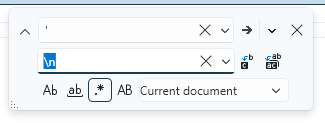
Notice how the "Use Regular Expressions" option (Alt+E) must be set for this to work.
Happy text processing!