How do I upgrade my solution file to the new SLNX format with Visual Studio 2026?
Posted: (EET/GMT+2)
Today's post is a quick tip on how to upgrade/migrate your .NET solution files (.sln) into Visual Studio 2026's new XML-based .slnx file format.
I was guessing myself that there would be some kind of migration command for this in the IDE, but it turns out that the solution (haha) is very straightforward: you just save the solution as a new file, and choose the new formal along the way.
So, to do it, open your solution just normally in Visual Studio 2026, and then, in the make sure you have selected the solution item from the Solution Explorer window. Then, from the main File menu, select Save <MySolution> As... (or press Alt+F, A) and once the Windows file saving dialog box opens, select the new file format under the Save as type option:
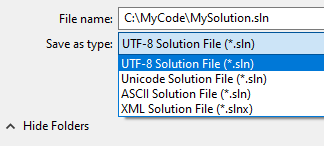
This will do the trick!